First session in Live
From an empty track to memory echoes in ten minutes
You need a Live set with some audio playing in time: a drum loop, a synth part, your own playing through an input. Anything with a few different bars works best, because memory is about recalling similar bars.
1. Load it and hear a plain delay
- Drag MINERVA Space Echo (browser → Plug-Ins → CrumpLab) onto the track, after your instrument.
- Open the preset menu at the top of the plug-in window and choose 02 Tape Delay.
- Press play.
You hear a 1-bar tape delay with a little feedback. That is not a coincidence: with Memory Capacity set to 1, memory holds exactly one bar and always answers with it, so the model reduces to a delay. This is a good check that tempo sync and routing work.
2. Give it a memory
Choose 03 Memory Echo. Memory now holds up to 100 bars. Watch the memory matrix (top left): a new row appears at every bar line, oldest at the top.
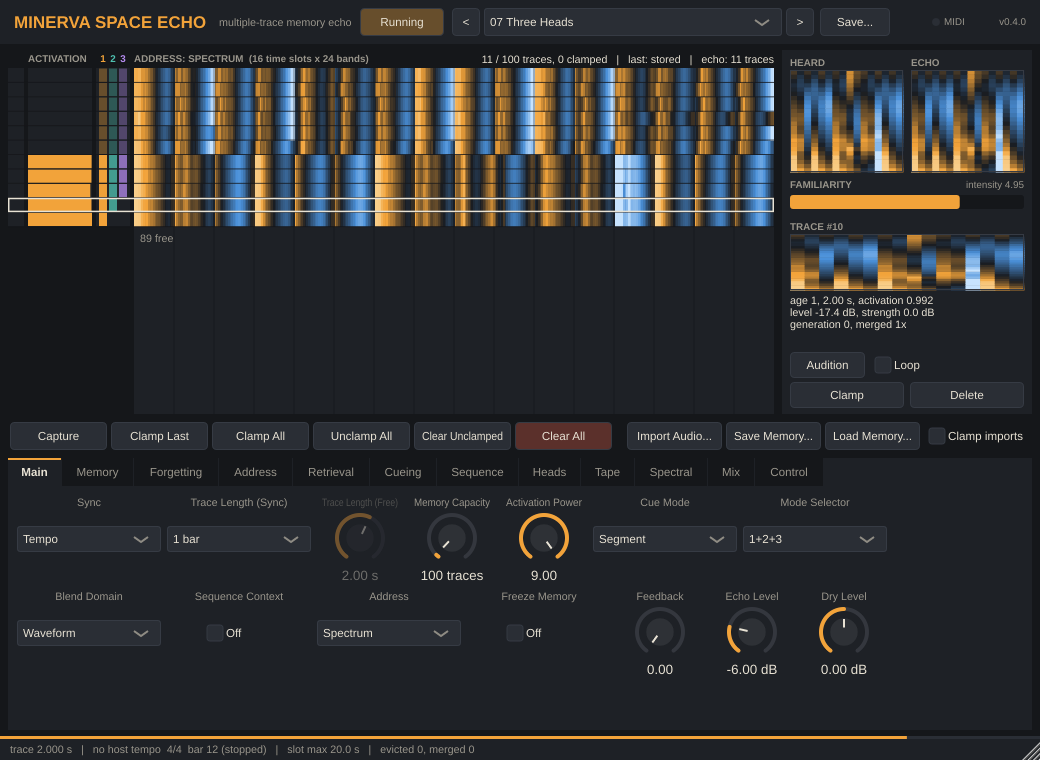
At each bar line the bar you just played becomes the cue. Every stored bar gets an activation (the amber bars in the Activation column) by how similar it is to the cue, and the echo you hear during the next bar is their activation-weighted blend. Each row’s coloured strip is its address: the spectrogram-like pattern MINERVA compares.
Play something new, then return to an earlier part: the rows from that earlier part light up again.
3. Hear only earlier memories
Choose 04 Deja Vu. Self Match is off, so the bar you just played can’t answer itself, and Activation Power is 9, so only the closest earlier bars answer. It stops sounding like a delay and starts sounding like being reminded.
Try Activation Power at 1 (Retrieval page): every memory contributes and the echo becomes a blurred average of everything you’ve played, what Hintzman called a schema.
4. Keep what matters
- Click the lock column (far left) on a row to clamp that bar: it will never be replaced when memory is full.
- Freeze Memory (Main page) stops storing: memory keeps answering but stops learning.
- Clear All empties memory; Clear Unclamped keeps the clamped bars.
5. Make it a Space Echo
Choose 06 Worn Space Echo or 21 Memory on Tape for wow, flutter, drive and a spring tail, or 07 Three Heads for the RE-201’s three playback heads. The Heads column shows which bars each head is playing (1 amber, 2 teal, 3 violet).
6. Seed it
Drag an audio file (a drum break, a phrase, a field recording) onto the plug-in window. It is cut into traces of the current length and added to memory, so what you play recalls pieces of it. See Importing and saving memory.
Where next
- How MINERVA works: what the plug-in is actually computing.
- The plug-in window: every part of the display.
- Presets and Listening examples.